Split sheets get lost.
Keep yours inside the song.

In Zoundroom, the split sheet lives in the song’s project, next to the lyric and the demos. Add the writers and their shares, export a clean PDF and have everyone sign it.

Updated:

A songwriting split sheet in Zoundroom: Chloe Bennett 60% for lyrics and melody, Sam Hughes 40% for music and production, total 100%, then the PDF signed by both.

Zoundroom’s songwriting split sheet is a page inside a song’s project where co-writers write down who did what and each writer’s share of the composition. Everyone on the project sees the same split and gets a notification when it changes. Once the shares add up to 100%, you export a PDF to print and sign, in English or seven other languages.

Inside the song, not in a folder somewhere

Open the song’s project, tap + and choose Songwriting split sheet. The title and today’s date are already filled in. Once it has writers, the split shows as a card above the project’s tabs, so it’s there every time you open the song, next to the lyric, the demos and the comments.
Writers, what each one did and their share

Pick people from the project or type any name: being on the project doesn’t make someone a writer. Mark what each one did (lyrics, music, melody, production or arrangement), type their share and, if they have them, their PRO, IPI number and publisher. Split equally does the math in one tap, and the sheet tells you how much is missing or over until it adds up to 100%.

A PDF to sign, in the language you’ll sign it in

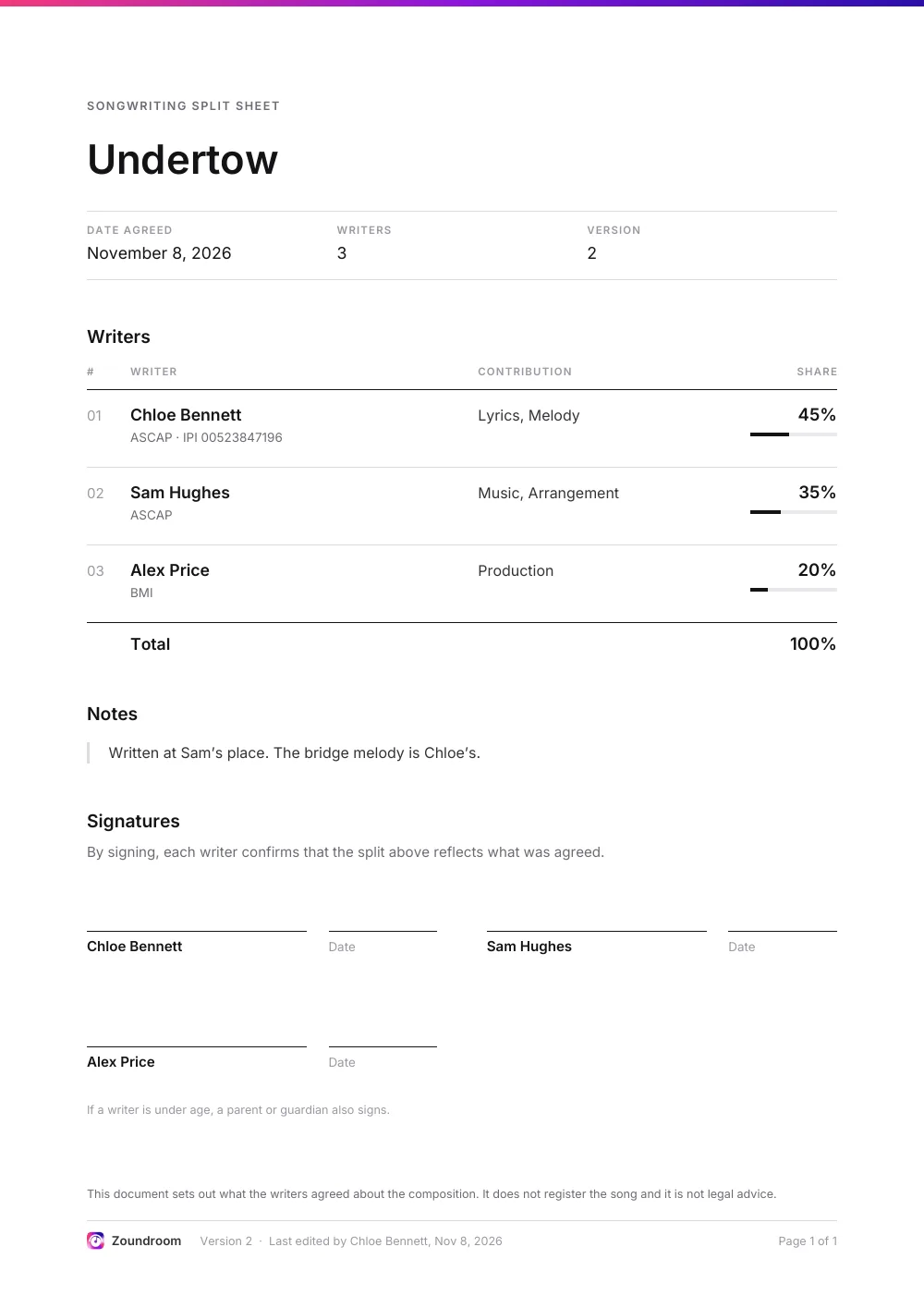
The PDF has the song, the date you agreed, a table with each writer’s contribution and share, your notes, and a signature and date line for every writer. It comes out in your app’s language or in English for international sessions, and you can also choose Spanish, Catalan, German, French, Italian or Portuguese (Brazil or Portugal).

A Zoundroom split sheet PDF in English for the song Undertow: three writers with their society, contribution and share (45%, 35% and 20%), the 100% total, a note, and a signature and date line for each writer.

Keep the signed copy with the song

Once everyone has signed, scan it to PDF and tap Save the signed sheet. It goes into the project’s Files and doesn’t count toward the Free plan’s 5-file limit. Already signed one on paper or with our free template? Choose I already have a signed sheet and keep that one instead.

Everyone on the project sees the same split

The owner and editors can change it; people with view access can read it and download the PDF. In a band space, every member can edit. When someone changes the split, the others on the project get a notification, so nobody finds out on release day.

Free template or the app?

The free template, in your browser

  • No account and nothing saved: download the PDF before you close the page
  • Everyone signs on screen with a finger or the mouse
  • Good for a one-off session or co-writers who don’t use Zoundroom
Open the free split sheet template

Zoundroom, with your co-writers

  • Saved in the song’s project, with the lyric and the demos
  • Everyone on the project sees it and is notified when it changes
  • Change it later: the PDF shows the version and who edited it last
  • PDF in 8 languages, signed copy kept in the project

Questions about the split sheet in Zoundroom

Is it free?

Yes. You can create a split sheet on any plan, including Free, and it doesn’t count toward the Free plan’s 5-file limit. Neither does the signed copy you save in the project.

Do my co-writers need Zoundroom?

No. You can type any name as a writer, and they sign the printed PDF. To see the split in the app and get notified when it changes, they need to be on the song’s project.

Does Zoundroom make the split official?

No. Zoundroom doesn’t register the song, doesn’t sign or certify anything and isn’t legal advice: it keeps what you and your co-writers write down. What you agreed is the PDF you all sign.

Does it cover the master recording?

No. The split sheet is about the composition, the lyrics and the music. Who owns the recording is a separate agreement.

Can we change the split later?

Yes. Anyone who can edit the project can change it, and the others are notified. Each PDF shows its version number and who edited it last. A signed copy stays as it was: to replace it, delete the old one in Files and save the new one.

Can I make one without an account?

Yes, with the free split sheet template on our website. It doesn’t save anything, so download the PDF when you finish. If you start using Zoundroom later, you can keep that signed PDF in the song’s project.

Keep the split in the song’s project, with the lyric and the takes.