Write your lyrics.
The rhymes come to you.

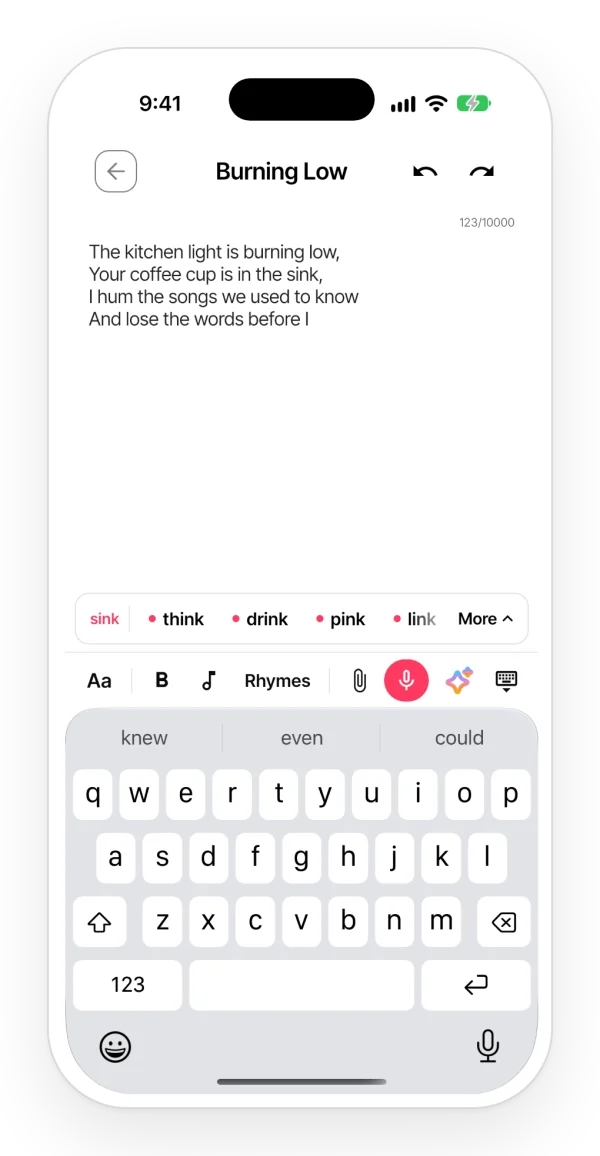
Finish a line and rhymes for the one still waiting for a pair appear above the keyboard. The ones that fit the syllable count are marked. One tap and they are in the lyric, next to the melody you record in the same note.

A lyric open in the Zoundroom app with a row of rhymes above the keyboard; the words that fit the line are marked with a dot.

It knows which line needs a pair

  • If you write in ABAB, it gives you rhymes for the line two up, not for the last one.
  • If everything already rhymes, it looks for the line before. It skips tags like [Chorus] and chord lines.
  • Want to change a word? Select it: you see its rhymes and, when you tap one, it takes the word’s place.

Rhymes that fit your line

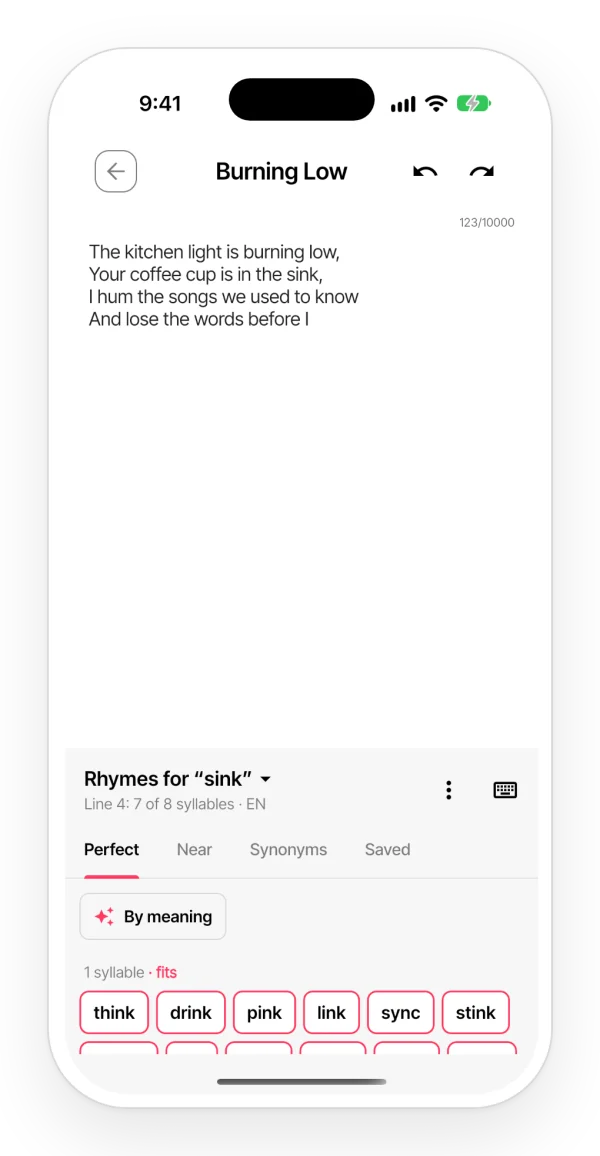
  • You see how many syllables your line has so far and how many its partner line has.
  • The rhymes that complete the count come first, with a colored dot.
  • Tap one and, if it does not convince you, tap another: it swaps in place.
The rhymes panel in place of the keyboard: rhymes for the line’s end word grouped by syllables, with the syllable count of the line you’re writing.

Every rhyme, without leaving the note

  • The «Rhymes» button opens the panel: perfect rhymes grouped by syllables, near rhymes and the words you save.
  • If you type fast, the row steps aside and comes back when you pause.

Synonyms that rhyme

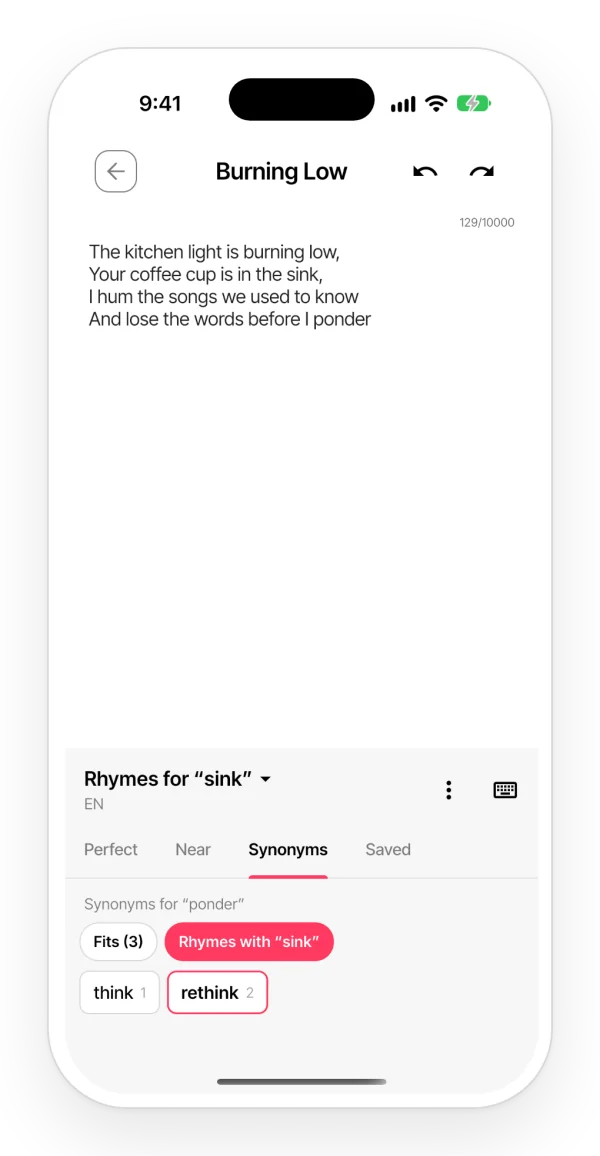
  • The word does not say what you mean? Look up a synonym and keep the ones that rhyme with your line.
  • They are grouped by meaning, with their syllables.
  • They download once per language and then work offline.
The Synonyms tab of the rhymes panel, filtered to show only the synonyms that also rhyme with the line above.

In the language of your lyric

  • Rhymes in English, Spanish, Portuguese, French, Italian, German and Catalan.
  • Zoundroom checks the language of each stanza, even if your app is in another one. If it gets it wrong, change it in the panel menu.
  • Swear words are hidden unless you want to see them.

Rhyming dictionary or rhymes in the app

Rhyming dictionary (web)Rhymes in the app
How you searchYou type the wordThey come up when you finish a line
Which wordThe one you pickThe end of the line that needs a pair
SyllablesGrouped by syllablesMarks the ones that fit your line
Into the lyricCopy and pasteOne tap
WhereIn the browserOn iPhone, iPad, Android and in the browser
PriceFreeFree

Who it’s for

For anyone who writes lyrics: singer-songwriters, rappers, lyricists and bands. If you want an AI to write the whole song for you, Zoundroom is not for that. Here, the lyrics are yours.

Try it in a minute

  1. 1 Download Zoundroom and create a project with the title of your song.
  2. 2 Tap «Add» → «Note» and write two lines.
  3. 3 Start the third and pause for a moment: rhymes for the first one come up above the keyboard.

Frequently asked questions

Are Zoundroom’s rhymes free?

Yes. The rhyme row, the panel, near rhymes, syllables and saved words are free, with no limit. So are the synonyms.

Do they work offline?

On your phone, yes: the rhymes live inside the app. Synonyms download once per language and then work offline too. In the browser, you need a connection.

Which languages have rhymes?

English, Spanish, Portuguese, French, Italian, German and Catalan. The language comes from your lyric, not from the language of the app.

How do I turn off the rhyme row?

In the ⋮ menu of the panel, for this note or for all of them. Also in «My profile» → «Rhymes as you type». The «Rhymes» button still opens the panel whenever you need it.

Can I use them on my computer?

Yes, at app.zoundroom.com: sign in with your account and you have the same notes as on your phone. Rhymes come up the same way as you write, and the «Rhymes» button opens the panel. If you only need one word, the rhyming dictionary and the syllable counter are free.

Your next rhyme is already above the keyboard.
Start free with Zoundroom.