Chords over your lyrics.
And they play.

Tap a chord in the bar and it stays over the syllable where it changes. Move the song to your key, on your phone or in your browser. On your phone, you also hear each chord on guitar, piano or ukulele and play the song at tempo with play mode.

Just need a chord sheet? Use the chord sheet maker

Free on iPhone, iPad and Android, and at app.zoundroom.com

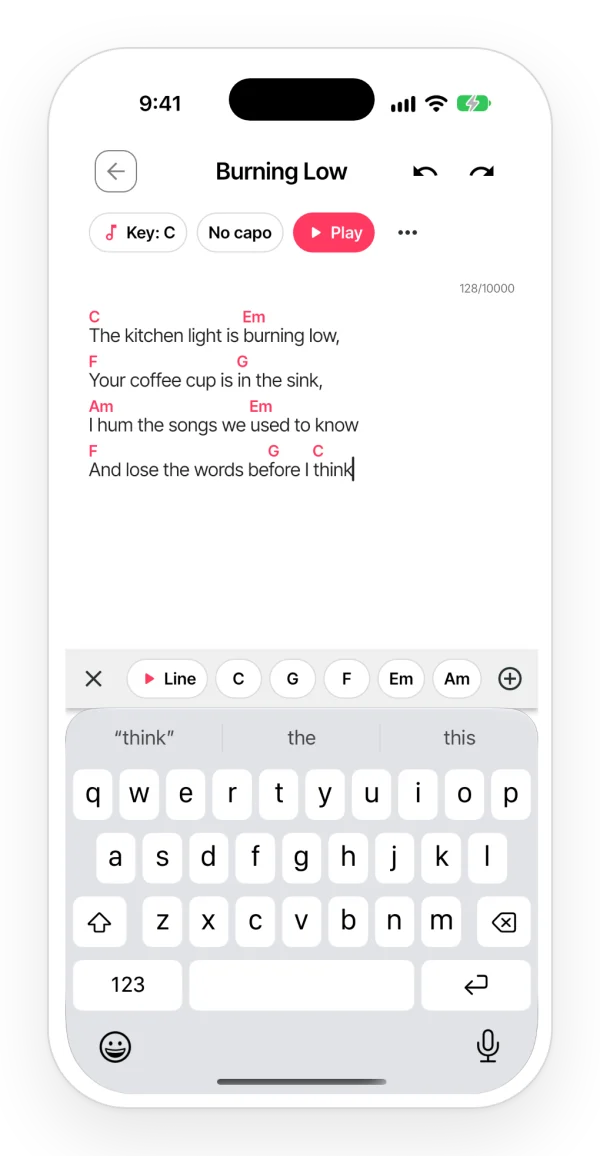
A lyric with chords above the words, the Key, Capo and Play header, and the chord bar above the keyboard.

One tap and the chord goes to its syllable

  • The bar above the keyboard suggests your recent chords and the ones in the song’s key.
  • Missing one? In «Another chord», pick the note, the type (m, 7, maj7, sus4, dim, add9…) and the bass.
  • Once it is in, the cursor jumps to the next word so you can keep the progression going.
  • In the browser too: at app.zoundroom.com, open «Chords» in the note’s bar and add, move or remove them the same way.

Hear if it sounds right

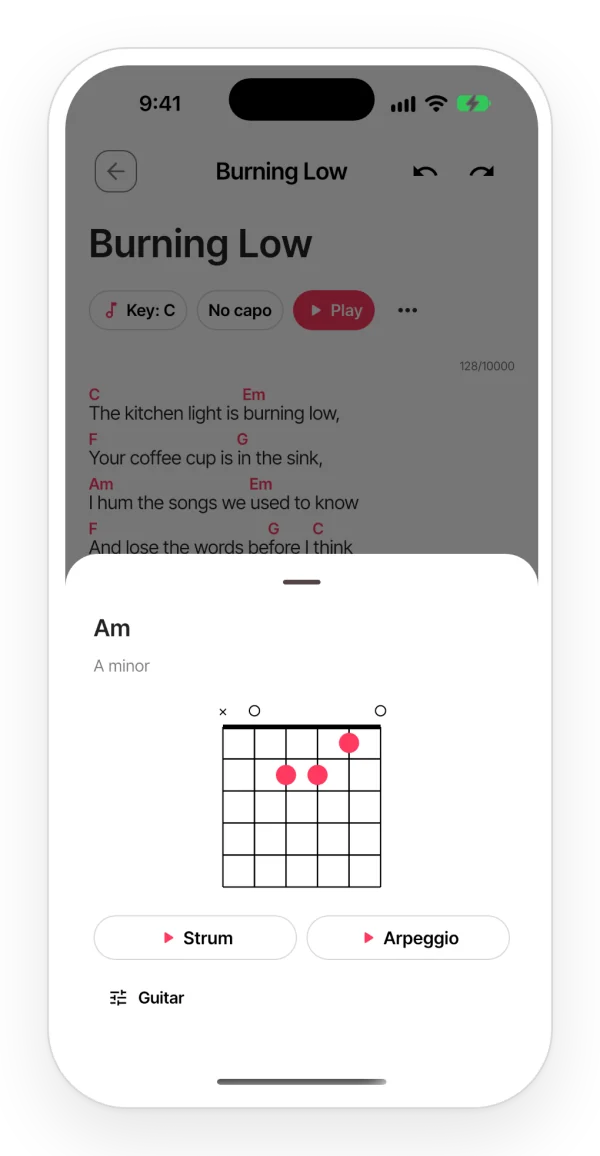
  • On your phone, tap any chord in the lyric and it plays on guitar, piano or ukulele, with samples of real instruments.
  • Touch and hold it to see how to play it: the guitar or ukulele diagram, or the piano keys.
  • With «▶ Line», you hear the chords of that line one after another.
A chord card with its guitar diagram and buttons to hear it strummed or as an arpeggio.

Play mode

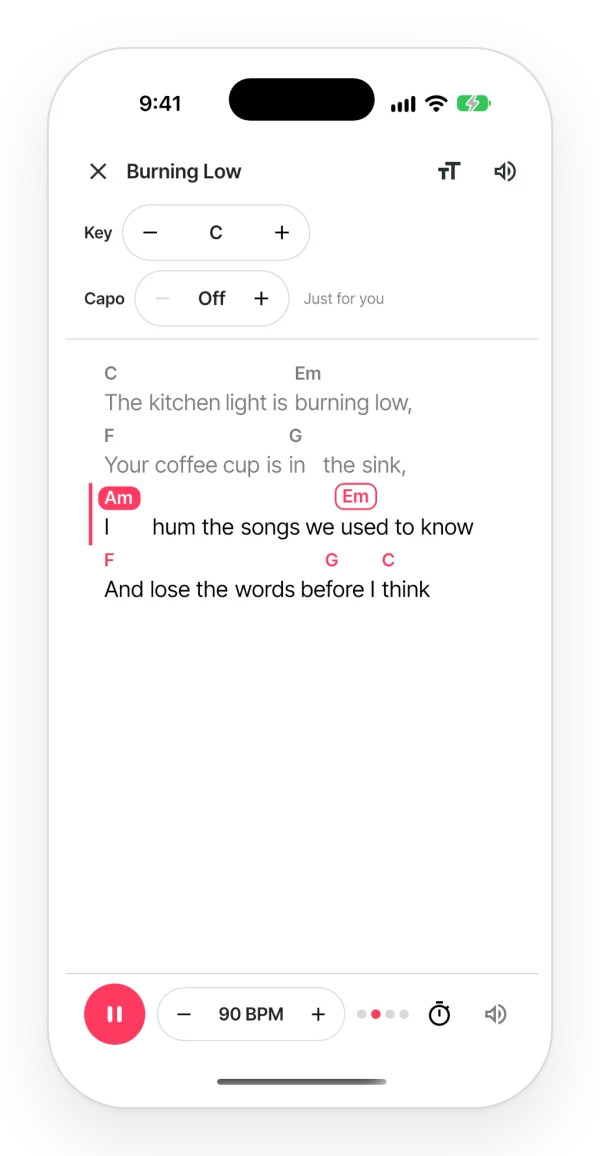
  • On your phone, the lyric in large type, with the chords above it.
  • Hit ▶ and the progression plays at the tempo you choose, with a metronome and a count-in bar.
  • The lyric scrolls on its own and shows you the chord that is playing and the next one.
Play mode: the song plays at its tempo, the current chord is highlighted and the next one is outlined as the lyric scrolls.

Your key, your capo, your notation

  • Move the song up or down a semitone at a time: the chords and what you hear change with it. If you share it, it changes for everyone.
  • The capo is just for you: you see the shapes to play with it, and Zoundroom suggests the fret that leaves the most open chords.
  • Choose how you read them: «C D E», «Do Re Mi» or «C D H», the German one. Everyone sees their own.
  • The key, the capo and the notation, in the browser too.

With your band, without the mess

  • Each chord sticks to its lyric: if someone types before it or splits the line, on their phone or in the browser, it moves with it.
  • Anyone who can only view the note also sees the chords, on their phone and in the browser. On the phone, they also hear them.
  • Copy it with the chords above, or as ChordPro to take it to another app.

Who it’s for

For anyone who writes songs on guitar, piano or ukulele, for anyone who sings in another key, and for bands and worship teams who share the sheet.

Try it in a minute

  1. 1 Open the note of your song and tap «Chords» in the bar above the keyboard. In the browser, it is in the note’s bar.
  2. 2 Put the cursor on the syllable and tap the chord.
  3. 3 On your phone, tap «Play», hit ▶ and sing over it.

Frequently asked questions

Is it free?

Adding, moving, removing and transposing chords and hearing them is free. In play mode, the large lyric, the key and the capo are free too.

Do they show on the web?

Yes. At app.zoundroom.com you see the chords above the lyric and add, move and remove them just like on your phone. You also change the key, the notation and the capo, and copy the song with chords or as ChordPro. To hear them and for play mode, use the phone app.

Do the chords stop the music I am listening to?

No. They mix with music from other apps without stopping it. On iPhone they play even in silent mode, because you asked for them; on Android they follow the media volume.

If I change the key, does it change for my band too?

Yes. «Song key» changes it for everyone who sees the note. To try another key just for you, use the capo or, on your phone, play mode.

Can I paste a song with the chords already written?

Chords written as text («C G Am F»), including the ones on a sheet from the chord sheet maker, stay as text: they do not play or follow the lyric. To put them over their syllable and hear them, use the chord bar. The other way round works: «Copy as ChordPro» takes the song with its chords to another app.

Letter names or Do Re Mi?

Both, and German too: «C D E», «Do Re Mi» or «C D H». By default you see the one for your language; change it in the «Chords» sheet, under «Notation». It only changes how you see them.

Write the lyric, add the chords and hear it.
Start free with Zoundroom.