You wrote the lyrics.
Now put music to them.

Put a chord over each syllable, hear it on guitar, piano or ukulele and play the whole song at your tempo while the lyric scrolls. Then sing the melody into the same note, so the words, the chords and the take stay together.

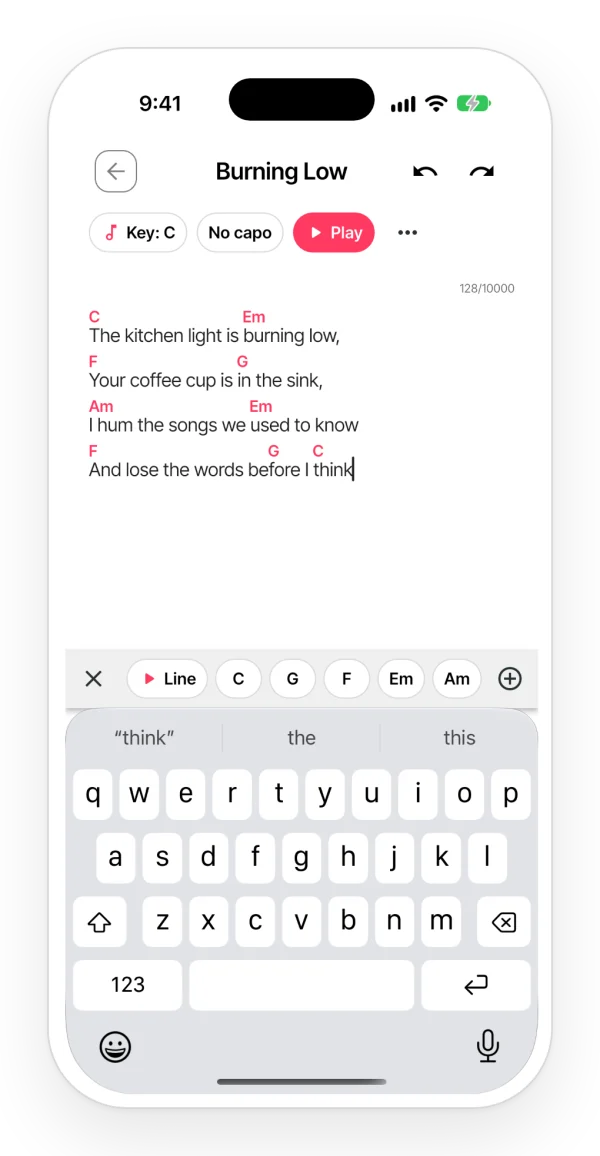
A lyric with chords above the words, the Key, Capo and Play header, and the chord bar above the keyboard.

How it works

  1. 1 Open the note with your lyrics and tap “Chords” in the bar above the keyboard. In the browser, “Chords” is in the note’s bar.
  2. 2 Put the cursor on the syllable where the chord changes and tap a chord. It stays there and plays.
  3. 3 Tap “Play”, hit ▶ and sing over it: the progression plays at your tempo while the lyric scrolls.
Find chords that fit, even if you don’t know much theory

  • The bar suggests the chords of the song’s key and the ones you used last. With no chords yet, it starts from C major: C, Dm, Em, F, G, Am and B°.
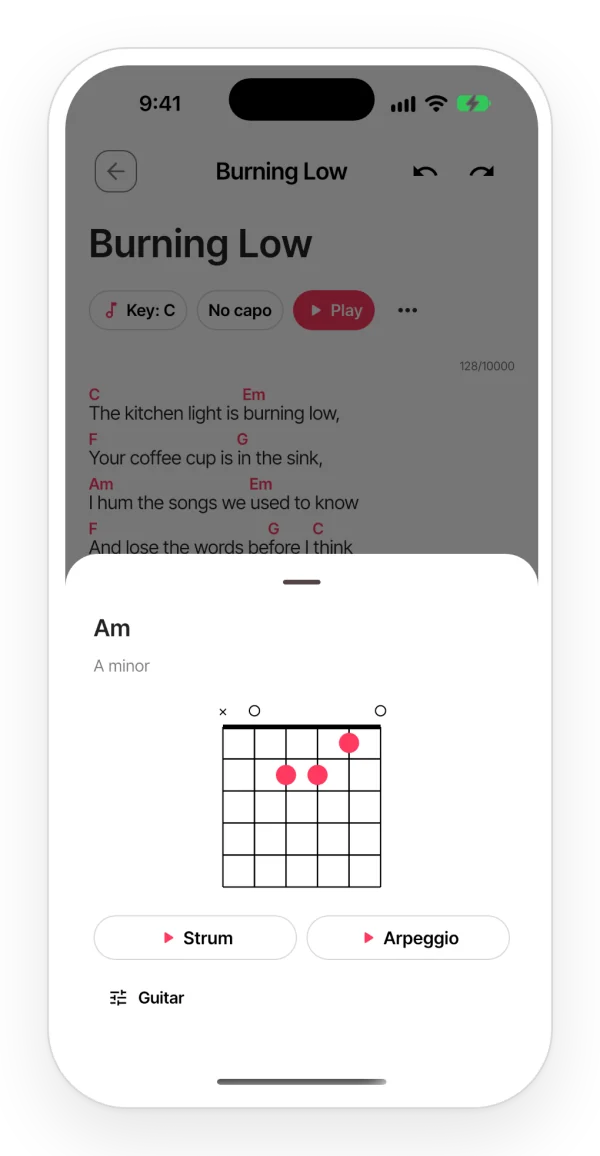
  • Tap any chord in the lyric to hear it. Touch and hold it to see how to play it: the guitar or ukulele diagram, or the piano keys.
  • With “▶ Line” you hear the chords of one line in a row, so you can tell if the change lands on the right word.
  • Missing one? “Another chord” lets you pick the note, the type (m, 7, maj7, sus4…) and the bass.
A chord card with its guitar diagram and buttons to hear it strummed or as an arpeggio.

Hear the whole song at your tempo

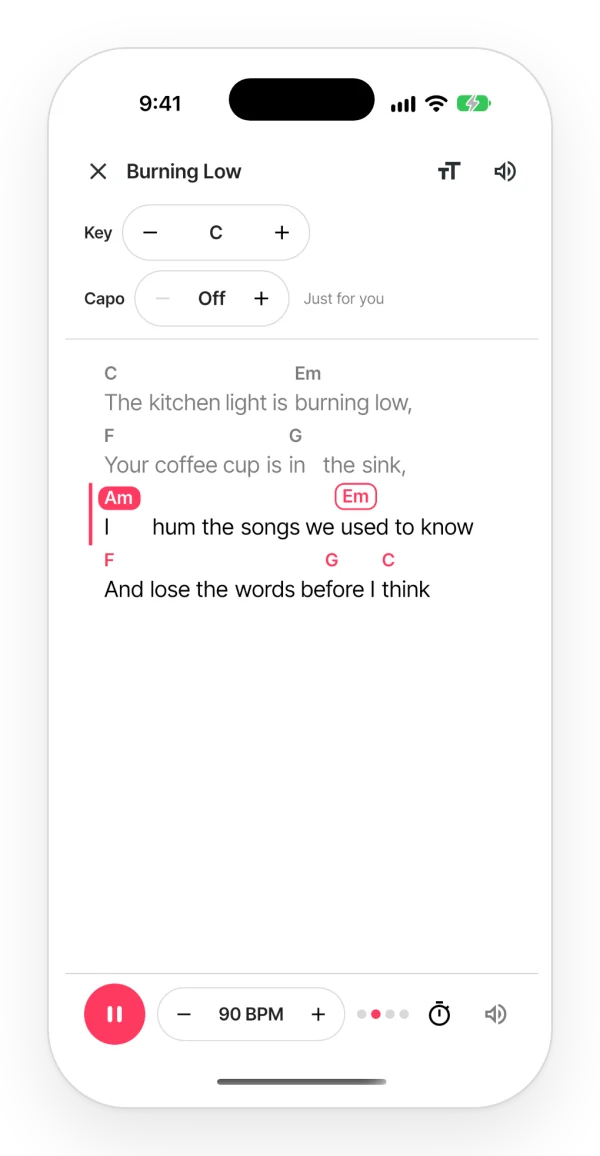
  • Play mode shows the lyric in large type with the chords above it. Hit ▶ and the progression plays on guitar, piano or ukulele, with a metronome and a count-in bar.
  • Set the tempo between 40 and 200 BPM. The lyric scrolls on its own and shows the chord that is playing and the next one.
  • Without Pro, you can play the whole song a few times for free. After that, it takes Pro.
Play mode: the song plays at its tempo, the current chord is highlighted and the next one is outlined as the lyric scrolls.

Move it to your voice

  • “Song key” moves the whole song up or down a semitone at a time, and what you hear moves with it.
  • The capo is just for you: you see the shapes to play, and Zoundroom suggests the fret that leaves the most open chords.
  • Read the chords as C D E, Do Re Mi or the German C D H. Each person who opens the note sees the notation they picked.

Sing the melody into the same note

  • Tap the microphone inside the note (“Record” in the browser) and sing the line: the take is inserted at the cursor, right under the words it belongs to.
  • A week later, you open one note and it’s all there: the lyric, the chords and how the melody went. Not a voice memo in one app and the words in another.
  • Stuck on the music? Ask Auralis, the assistant in the note, for a “Chord progression”: it answers in text with chord symbols, and you choose what to try.

Questions

How do I put music to lyrics I wrote?

Start with the chords. In Zoundroom, open the note with your lyrics, tap “Chords” and put a chord on each syllable where the harmony changes. Tap them to hear them, then play the whole song at your tempo in play mode and sing a melody over it. Record that melody inside the same note so you keep it.

Does Zoundroom make the music or sing my lyrics for me?

No. It does not generate songs or vocals with AI. You choose the chords and the app plays them on guitar, piano or ukulele so you can hear how your lyric sounds. Auralis, the assistant in the note, only suggests progressions and lines as text.

Is there a free app to put music to my lyrics?

Zoundroom is free to start. Adding, moving and transposing chords, hearing them and the large lyric of play mode are free. Playing the whole song with ▶ is free a few times per account; after that, it takes Pro.

I don’t play an instrument. Can I still use it?

Yes. You hear every chord without playing anything, the bar suggests chords that belong to the song’s key, and touching and holding a chord shows how it is played on guitar, ukulele or piano.

Can I record the melody I come up with?

Yes. Record inside the note and the take is inserted at the cursor, under the line it belongs to. Each recording counts toward the free plan’s limit.

Does it work on a computer?

Yes. At app.zoundroom.com, with the same account, you add and move chords, hear them, change the key and use play mode.

Can I paste a song that already has chords?

Chords pasted as text, like “C G Am F” on their own line, stay as text: they do not sit on a syllable or play. To hear them, add them with the chord bar.

Updated

Don’t leave your lyrics without a melody.
Start free with Zoundroom.