How to record a demo at home (without expensive gear)
A practical guide to recording a demo at home: the gear you need, the best software to use, and how to never lose your tracks.
Eliseu Bellés · Founder of Zoundroom. Musician and entrepreneur from Valencia. I am building Zoundroom so musicians stop losing their best ideas.
How to Record a Music Demo at Home (Without a Professional Studio or Expensive Gear)
Thursday's practice is coming up and your band needs to hear the new track before you get there. You've got the melody down, the structure mostly figured out, and a few good lines. But the song only exists in your head. And nobody else can hear inside your head.
Recording a demo at home doesn't require a professional studio. It doesn't require a big budget. It requires knowing what kind of demo you need at this stage of the process, and having the bare minimum gear to get it done. Nothing more.
This post will show you exactly that: how to take the idea from your head and turn it into a useful recording, without getting bogged down by unnecessary gear or irrelevant production techniques.
Before You Record: What Is This Demo For?
Not all demos serve the same purpose. The gear you need, the time worth spending, and the quality standard that makes sense all depend directly on how you plan to use the recording.
There are three main types based on your stage in the process. A scratch demo is the fastest and rawest: its only goal is to capture the idea before it's lost. A work-in-progress demo has structure, and is used to develop the song and share it with collaborators. A pitch demo is the most polished, used when you need someone external to understand the track easily.
If you want to dive deeper, our post on what a music demo is breaks it all down. But what matters before you power up your microphone is asking yourself: what is the goal of this recording? The answer dictates your entire setup.
The Minimum Gear Needed for Each Type of Demo
For a Scratch Demo: The Phone in Your Pocket
The microphone on any modern smartphone can capture a clean vocal or acoustic guitar in a quiet room. You don't need anything else to capture an idea before it slips away.
A quick upgrade: standard earbuds with a built-in mic will instantly improve vocal quality over your phone's built-in speaker. They cost barely anything and work perfectly. If you have them, use them.
Recommended apps for quick capture: your phone's native voice recorder works, but it's limiting. For a more organized approach, our post on how to record demos on your phone details the best options available.
For a Work-in-Progress Demo: An Audio Interface and Basic Mic
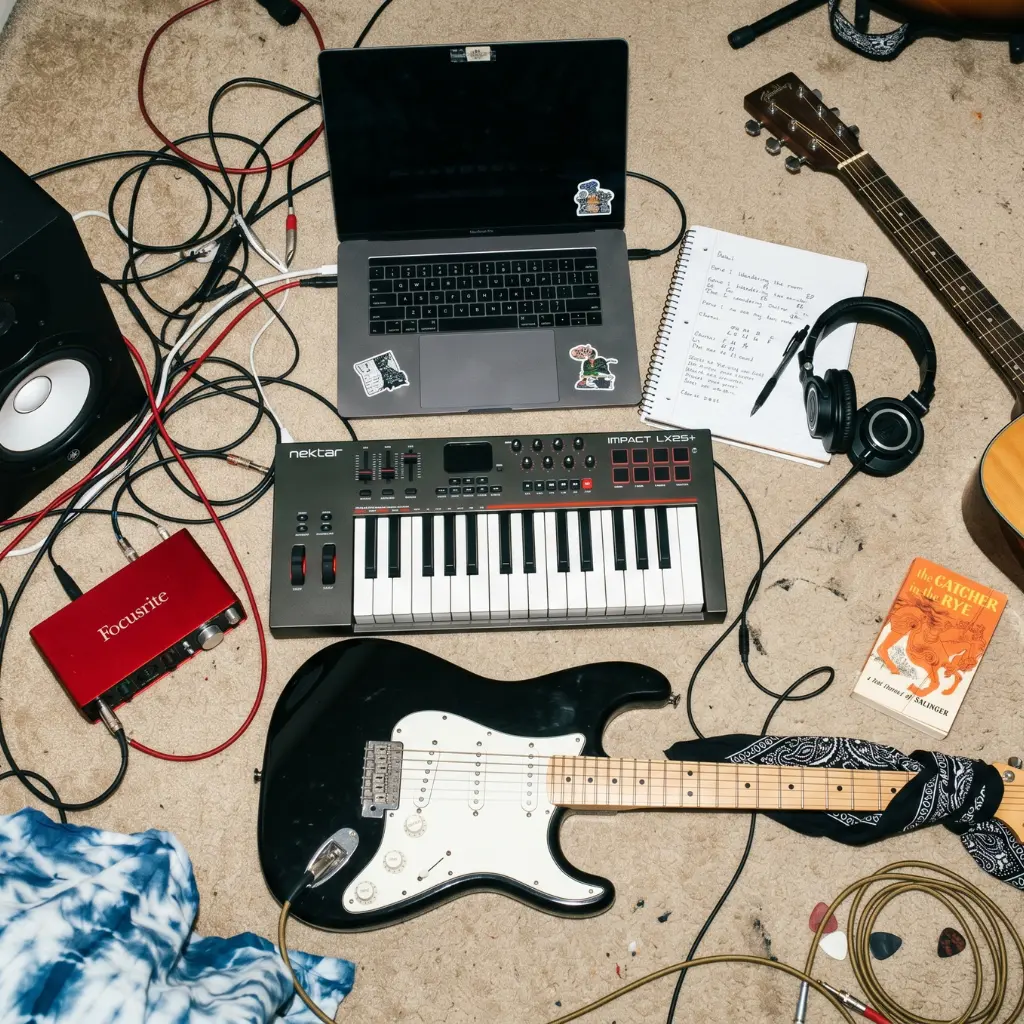
This is where a small investment is worth it. The bare minimum useful setup consists of just two things:
An audio interface: This connects your instrument or microphone to your computer with clean quality. Entry-level options are perfect for demos. The Focusrite Scarlett Solo ($80-$100) is the market standard: reliable, simple to configure, with stable drivers for Mac and Windows. The Behringer UM2 ($30-$40) is the cheapest option and gets the job done for work-in-progress demos.
A basic condenser microphone: Perfect for vocals and acoustic guitar. The Audio-Technica AT2020 ($80-$100) is the gold standard for starter home studios. The Behringer B-1 ($50-$60) is a cheaper alternative that works well in quiet rooms.
With an interface and a basic mic, you get a solid workspace setup for under $200 that will last you years. If you play electric guitar or bass, you can plug straight into the interface without a mic and use amp simulator software.
For a Pitch Demo: Add Studio Headphones
Use the exact same setup above, but add closed-back headphones to monitor what you are recording. Studio headphones don't color the sound like consumer headphones do; you hear exactly what's being recorded. The Audio-Technica ATH-M20x ($50-$60) are the most recommended entry-level option. The Sony MDR-7506 ($80-$90) are the industry standard at this price point.
With an interface, microphone, and studio headphones, you have everything you need to make a solid pitch demo from home. The total budget for new gear is between $200 and $300.
What Software to Use for Recording at Home
You don't need Pro Tools or Logic to record a great demo. These three free options are more than enough for 95% of projects, stable, and highly documented.
GarageBand (iOS and Mac, free): The best option if you are on Mac or iPhone. Intuitive interface, built-in virtual instruments, and seamless integration across Apple devices. GarageBand handles multi-track recording and demo creation perfectly without costing you a dime.
BandLab (iOS, Android, and Web, free): Cross-platform with built-in online collaboration. You can start a recording on your phone and finish it on your computer. Perfect for bands who want to share and edit tracks remotely.
Audacity (Windows, Mac, and Linux, free): Visually basic but powerful for multi-track recording and audio editing. The learning curve is slightly steeper than GarageBand, but there are thousands of tutorials online and it gets the job done.
If you already have one of these installed, stick with it. There's no need to switch software just for the sake of it.
The Step-by-Step Process
1. Prep Your Space
The biggest enemy of any home recording is background noise. Pick the quietest room, shut the doors and windows, and put your phone on do-not-disturb. Rooms with carpets, curtains, or closets full of clothes absorb sound much better than empty rooms with bare concrete walls.
You don't need professional acoustic treatment for a home demo. Just record in a small room instead of a large one, and avoid corners where sound tends to build up and bounce.
2. Tune Up Before You Play
It sounds obvious, but it's the most common mistake. An out-of-tune demo is useless, no matter how good the performance is. Tune your instrument right before you press record, not an hour prior. Temperature and humidity will shift your tuning quickly.
If you are recording vocals, warm up first. Just five minutes of simple vocal scales will make a huge difference in your control during your tracking session.
3. Rehearse Before Arming the Mic
A demo tracking session is not a practice session. Record what you already know how to play, not what you're still figuring out. If you have to stop three times at the same spot, that part needs more rehearsal, not more takes.
The golden rule: if you can't play the song from start to finish without stopping, keep practicing before you record. Rehearsing saves you hours of frustrating, wasted takes.
4. Structure Your Session
For a simple demo (vocals and guitar, or keys and vocals), the most efficient workflow is:
First, record your rhythmic or harmonic base—the guitar or piano that keeps the tempo and chord progression. This track is the skeleton for everything else. Next, record the lead vocal. Finally, add backing vocals or extra instruments if needed.
Do two to four takes of each element maximum. Any more than that will lead to analysis paralysis and ear fatigue, making it impossible to judge your recordings objectively.
5. Step Away and Review
Once you finish recording, wait at least thirty minutes before listening back. Time gives you the distance needed to listen objectively. What sounded great right after recording might have obvious mistakes once you hear it with fresh ears.
Listen on headphones and also on your phone speaker. If it sounds clear on a phone speaker, it will translate anywhere. It's the ultimate test.
The Most Common Home Recording Mistakes
Obsessing over quality too early. A scratch demo doesn't need to sound perfect. It just needs to get the idea across. Spending an hour dialing in the perfect guitar tone for a 30-second idea is wasted time.
Recording without practice. We've said it, but it bears repeating. Recording exposes execution errors. Mistakes you barely notice when jammin' live become highly obvious once tracked.
Too much background noise. Computer fans, refrigerators, street traffic. You tune these out while playing, but your mic will pick them up clearly, especially in the quiet spaces between lyrics. Identify and shut down these noise sources before you record.
Recording too hot (too loud). Digital clipping cannot be fixed in the mix. If your waveform is hitting the top of your DAW screen, your track is clipping and ruined. Always record with headroom: aim for an input level between -12 and -6 dB during the loudest parts.
File clutter. You finish the session with six files labeled "recording1," "recording1_final," "recording1_final2," and "recording_good." Three weeks later, you won't remember which is which. Label files clearly from the start: song title, date, and track type.
Losing your demo in download folders. A demo sitting alone in your phone's downloads folder is bound to get lost. Without your lyrics or notes next to it, it loses most of its context and value.
What to Do with Your Finished Demo
Recording the demo is only half the battle. The other half is using that recording to actually push the song forward.
An isolated audio file is only so useful. What makes it powerful is the context around it: evolving lyrics, chords, notes on what works or needs fixing, and feedback from your band. If these things live in different apps, your creative process breaks down.
When you share a demo with your band on WhatsApp, valuable feedback gets lost in endless chat threads and memes. When you save it on Google Drive, it's disconnected from your lyrics and ideas. Re-building that context every time you return to the song drains your creative energy.
Zoundroom is built to keep your demos alongside your complete songwriting project. Keep your audio files right next to lyrics, chords, and notes. If you play in a band, you get a shared space where everyone can listen and leave feedback tagged to the exact millisecond of the audio. Your demo is no longer an isolated file—it's part of an organized workflow.
To see how this fits into a complete songwriting routine, check out our guide on the 5-step system to organize your music.
Frequently Asked Questions
Do I need acoustic treatment to record a demo? Not for scratch or work-in-progress demos. For a pitch demo, it helps, but is not vital. Recording in a room with furniture, carpets, and clothes will dampen echo naturally. The main thing is removing background noise: laptops, appliances, and outside traffic.
Can I record a full band demo at home? It depends on the instruments. Vocals, acoustic guitars, keys, and DI bass are easy to track at home with the setups described above. Drums are the hardest to record; they require multiple mics, space, and a treated room. The best workarounds are using virtual drums, an electronic kit with direct output, or recording live drums at your rehearsal space with a simple room mic setup.
How long does it take to track a work-in-progress demo? For a simple acoustic or piano-vocal song, about one to two hours including setup, tracking, and reviewing. Adding more tracks will add 30-60 minutes per instrument. The key is rehearsing ahead of time to minimize take counts.
Can I use this same setup for multiple projects? Absolutely, and you should. Once you set up your workspace and learn the basics, tracking subsequent songs becomes second nature. You pay the learning curve once, and then you're set.
What if my demo sounds too dry or empty? Adding a touch of reverb to your vocal tracks (available for free in GarageBand and BandLab) instantly makes recordings sound more natural. Don't overdo it—you want it to sound like a natural room, not a cavern. For work-in-progress demos, a dry sound is perfectly fine; what matters is the song itself.
The most valuable demo is not the one that sounds the cleanest. It's the one that actually exists. The one you recorded when inspiration struck, with whatever you had on hand, without waiting for the perfect gear or the perfect time.
Get Zoundroom today and start building out your songwriting catalog, from your first raw voice memo to the demo you share with the band.