How to organize your music in progress: projects, not files
Organize your songs in progress without losing ideas along the way. The difference between organizing files and organizing your musical projects.
Eliseu Bellés · Founder of Zoundroom. Musician and entrepreneur from Valencia. I am building Zoundroom so musicians stop losing their best ideas.
How to Organize Your Music in Progress: Projects, Not Files
You open your phone looking for that melody you recorded last week. It's somewhere. Maybe in Voice Memos. Or in the WhatsApp group where you sent it to yourself. Or in the downloads folder. Or in that note named "song ideas 3" that contains twelve different things without context.
You find it. Or you don't. It doesn't matter, because even if you do find it, you don't remember what lyric went with it, what stage the song was in, or if that chord progression was for the verse or the chorus.
This isn't a memory or discipline problem. It's a system problem. And the wrong system isn't about you being messy—it's that you're using tools designed to organize music as a listener to organize music as a songwriter. These are two completely different challenges.
The Core Mistake: Organizing Music Like a Library
When you search "how to organize my music" online, almost everything that comes up talks about folders by genre, metadata, iTunes, file libraries. That system makes sense if you are a listener or a DJ: you have finished songs and you want to find them fast.
But if you are a songwriter, your songs aren't finished. They are in progress. And a song in progress is not a file. It's a collection of things growing together: an audio recording that changes, a lyric with five versions, some chords being tweaked, notes on choices you made and decisions you haven't made yet.
Stuffing all of that into a folder with the song's name solves nothing. The folder just groups files. It doesn't tell you what state the song is in, it doesn't connect the audio with the lyrics, and it doesn't remind you what was left to figure out the last time you worked on it.
The result is always the same: you have lots of captured ideas and very few finished songs. Not because you lack talent or time. But because the system you use to organize isn't built for the songwriting process.
The difference between a songwriter with 50 ideas and one with 10 finished songs is rarely talent. It's almost always the system.
What a Songwriter Really Needs to Organize Their Music
A song in progress has five elements that need to live together for the system to work:
Audio. The recording or recordings of the song in its current state. There could be several: the initial hummed capture, the working demo with guitar, the version with drums from the last rehearsal. All of them are the same project, not separate files.
Lyrics. The text in progress, with its versions. Not a separate Word document, but the lyrics inside the song project, accessible at the same time as the audio.
Chords and structure. The progression, key, tempo, section outline. It can be a brief note or a detailed map, but it must be in the same place as the audio and lyrics.
Working notes. What you decided in the last rehearsal. What needs resolving. The reference that inspired that melody. The bassist's comment about the bridge. Without these notes, every time you pick the song back up, you start from scratch.
Status. Where the song stands. Raw idea, in development, ready to record, finished. This element lets you know at a glance where to put your energy and how you've progressed.
When these five elements live in different places, the system breaks. Audio in Voice Memos, lyrics in the notes app, chords on a piece of paper, notes in a WhatsApp message, and the status only inside your head. Rebuilding the context every time you return to a song costs time and energy that should go into writing.
The Project System: What It Looks Like in Practice
The difference between a well-organized song and one lost among files isn't about the amount of information. It's about structure.
Song lost among files:
"bus_melody.m4a" on Voice Memos (recorded 3 weeks ago)
"dec ideas" in iPhone Notes (contains 8 different things, one is the lyrics to this song)
"new progression.jpg" (photo of a paper with chords, in the phone gallery)
An audio message on WhatsApp with the guitarist's feedback
The song's status: only in your memory
To pick this song back up, you need to open four apps, search through dozens of files, and rebuild the context from scratch. If you don't do it in the next few days, most of that context is lost.
The same song as a project:
A project named "Bus Song" with the status "In development"
Three audio recordings inside the project: the initial capture, the demo with guitar, the version with the new lyrics
The current version of the lyrics, right next to the audio
The chords written down on the same screen
A note: "The bridge needs more space, try changing to 8 bars. Reference: the bridge on X"
Picking this song back up takes thirty seconds. You open the project, see exactly where it was and what was left to solve. No rebuilding required.
The project system doesn't require more time or more discipline than the file system. It requires a tool that understands that a song is a project, not a file.
Status Tags: See at a Glance Where Each Song Stands
One of the most useful elements of the project system is the status. Not as a decorative label, but as a working tool.
With well-defined statuses, you can see at a glance how many songs you have in each phase and consciously decide where to focus. Without statuses, all songs seem equally urgent and equally abandoned.
A simple status system that works:
Idea. Audio captured, little or no development. The goal with these songs is to process them: listen, decide if they have potential, and move them to "in development" or consciously discard them.
In Development. The song has a basic structure and you are actively working on it. This is where most songs spend most of their time.
Ready to Record. The writing is locked in: lyrics, structure, chords. Just waiting for the final recording. This tag tells you there is no more songwriting work left, only production.
Finished. The song exists in its final form. It doesn't necessarily mean released, but rather that you are not going to change anything else.
On Hold. Songs you have consciously put away for now. You aren't abandoning them, you are pausing them. You can return to them. This tag stops paused songs from cluttering your view of what's active.
You don't need a system more complex than this. What matters is that you use the statuses consistently and review them regularly.
How to Escape the Chaos: The Transition From Where You Are Now
If you've been piling up ideas without a system, the first step is not to start organizing everything from scratch. It's to do an audit.
Step 1: Count what you have. Don't judge or organize yet. How many Voice Memos do you have? How many audio notes on WhatsApp? How many text notes with ideas? How many Drive folders with something musical in them? Just count. The exact number doesn't matter, what matters is getting a clear picture of where everything is.
Step 2: Listen to everything in one go. Book a one-hour session. Listen to every audio, read every note. For each one, decide: does it have potential or not? If it doesn't, discard it. If it does, give it a working title and a status tag. This is your initial processing.
Step 3: Group what belongs together. Sometimes you have three separate recordings of the same song at different times. Run them under the same project. This step reveals how many actual songs you have versus how many fragments.
Step 4: Start the new system with what's active. Don't try to migrate everything at once. Choose the three or four songs you are working on right now and start organizing them properly. The old archive can stay where it is. The new system starts today with what is active.
Step 5: Keep the system going with minimal effort. The system doesn't work if it takes up more time than writing music. A weekly fifteen-minute review, where you process new captures and update statuses, is enough to keep things organized. For a deeper look at this workflow, our post on the 5-step system to organize your music dives into each phase.
Tools to Organize Your Music in Progress
The right tool is the one that understands that a song is a multi-layered project, not a file with a name.
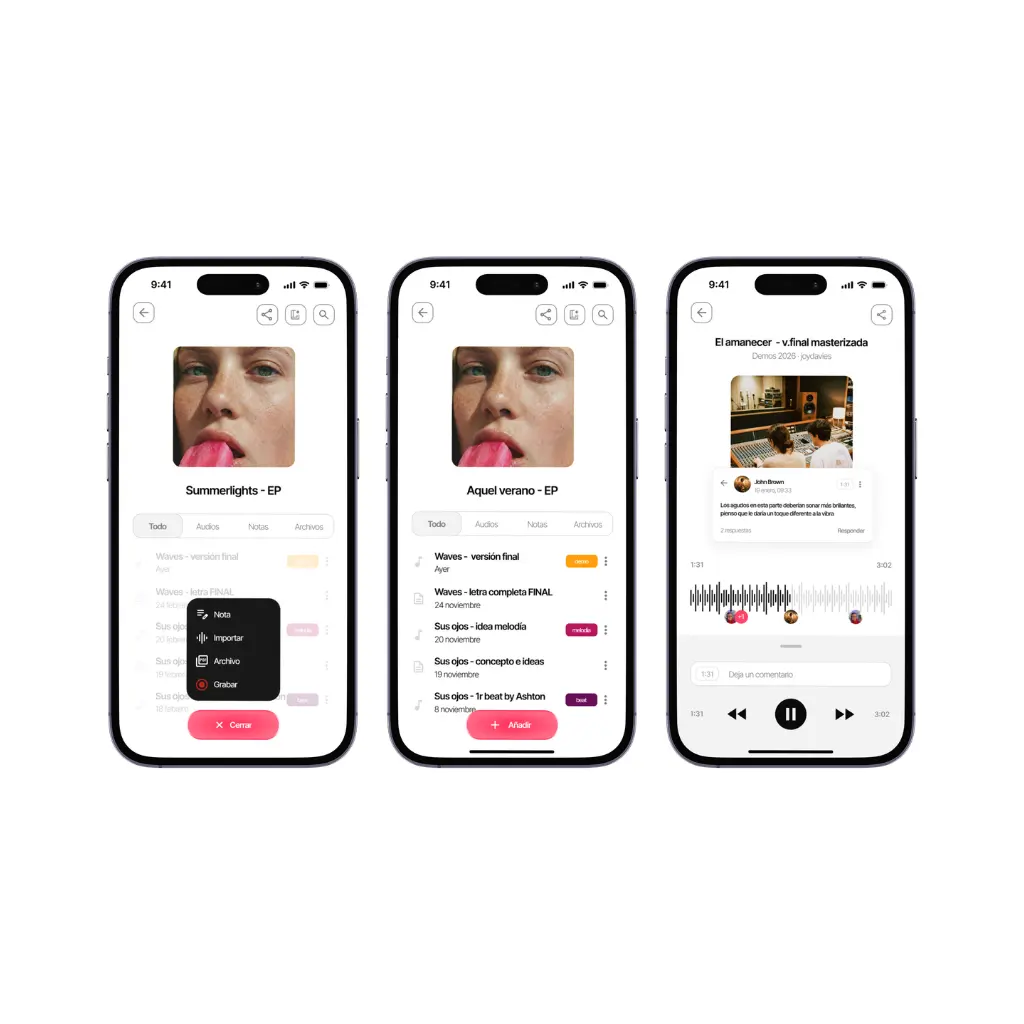
Zoundroom is built exactly for this use case. Each song is a project with audio, lyrics, chords, notes, and status. Everything in one place, accessible from your phone. Quick captures are linked to the project from the very first second, with no need for reorganizing later. The built-in AI assistant helps you when you get stuck developing a song, without replacing your creative process.
For bands, the Band plan creates a shared space where all members work on the same projects. The guitarist sees the same version of the lyrics as the singer. Comments are linked to the exact minute of the audio. No more rebuilding context at every rehearsal.
If you prefer a manual system, that works too, but it takes more discipline. A folder per song with subfolders for audio, lyrics, and notes, combined with a text document acting as a "song journal" where you track the status and outstanding decisions. It's more upkeep work, but it's viable if you are highly organized by nature.
What doesn't work is trying to use Voice Memos, Notes, WhatsApp, and Drive as a system. Not because they are bad tools, but because none of them understand what a song in progress is.
For a more detailed comparison of tools and software, our post on music organization software covers the main options in depth.
Frequently Asked Questions
How many songs is it reasonable to have in progress at the same time? It depends on the songwriter, but most work best with between three and eight active songs. With fewer, you limit yourself artificially. With more, the context of each song gets diluted and it's hard to make progress on any. Songs that exceed that active number are better off tagged "on hold" than left abandoned without a label.
What do I do with ideas when I don't know if they are songs yet? Save them with the "idea" status and don't spend more time on them until your next weekly review. Then decide if they are worth developing or if you archive them. The most common mistake is spending time developing ideas before you even know if they are going anywhere.
Is it worth organizing old songs I never finished? Only if they still interest you. Don't organize for the sake of organizing. If you listen to an old song and feel nothing, archive or discard it. If you listen and think "there's still something here," treat it as an active project.
Does the system work if I write very irregularly, sometimes a lot and sometimes nothing? Yes. The project system doesn't require consistent output, just minimal upkeep. If you don't write anything one week, that's fine. If the next week you capture ten new ideas, you process them in fifteen minutes and integrate them into the system. What matters is that when you return to a song after a while, the context is right there.
Do I need to learn anything technical to use this system? No. The project system doesn't require technical or production skills. It just requires understanding what elements make up a song in progress and having one place for those elements to live together. That's it.
A songwriter with the right system doesn't write faster. But they finish more songs. Because chaos doesn't just make you lose ideas—it makes you lose energy. Every time you have to rebuild a song's context before working on it, you waste time and focus that should be spent writing.
Organizing your music in progress isn't creative bureaucracy. It's the difference between having fifty scattered ideas and having ten songs on the way.
Zoundroom is designed for this. Download it for free at zoundroom.com and start with the songs you have active right now.